
-

-

-

- Austria (27)
- General (16)
- HowTo (122)
- IT Security (129)
- Linux (127)
- Networking (65)
- Other (3)
-

- CDemu - a free, gpl cd/dvd-rom device emulator for linux
- heatpumpMonitor - Monitoring a Stiebel Eltron LWZ
- ignis backup tool - the heat-strengthened backup tool
-

- December 2021 (2)
- September 2019 (1)
- May 2019 (1)
- April 2019 (1)
- January 2019 (1)
- October 2018 (1)
- August 2018 (1)
- February 2018 (1)
- September 2017 (1)
- August 2017 (2)
- May 2017 (1)
- April 2017 (1)
- February 2017 (1)
- January 2017 (2)
- December 2016 (1)
- November 2016 (2)
- October 2016 (1)
- September 2016 (1)
- August 2016 (1)
- July 2016 (2)
- April 2016 (1)
- March 2016 (3)
- February 2016 (4)
- January 2016 (2)
- December 2015 (2)
- November 2015 (2)
- September 2015 (2)
- July 2015 (5)
- June 2015 (4)
- May 2015 (2)
- February 2015 (1)
- January 2015 (4)
- December 2014 (1)
- November 2014 (5)
- October 2014 (4)
- September 2014 (1)
- August 2014 (4)
- July 2014 (3)
- June 2014 (5)
- May 2014 (5)
- April 2014 (1)
- March 2014 (2)
- February 2014 (3)
- January 2014 (5)
- December 2013 (2)
- November 2013 (3)
- September 2013 (3)
- August 2013 (2)
- May 2013 (4)
- April 2013 (1)
- March 2013 (1)
- February 2013 (3)
- December 2012 (3)
- November 2012 (3)
- October 2012 (1)
- September 2012 (2)
- June 2012 (1)
- May 2012 (1)
- April 2012 (1)
- March 2012 (1)
- February 2012 (1)
- January 2012 (1)
- December 2011 (4)
- November 2011 (1)
- August 2011 (1)
- March 2011 (1)
- October 2010 (1)
- May 2010 (3)
- January 2010 (1)
- September 2009 (1)
- August 2009 (5)
- July 2009 (5)
- June 2009 (4)
- May 2009 (1)
- April 2009 (1)
- January 2009 (1)
- December 2008 (6)
- November 2008 (6)
- October 2008 (2)
- September 2008 (11)
- August 2008 (4)
- July 2008 (7)
- June 2008 (2)
- May 2008 (7)
- April 2008 (5)
- March 2008 (9)
- February 2008 (15)
- January 2008 (11)
- December 2007 (3)
Tips / Solutions for settings up OpenVPN on Debian 9 within Proxmox / LCX containers
September 21, 2017
When I tried to migrate my OpenVPN setup to a container on my new Proxmox server I run into multiple problems, where searching through the Internet provided solutions that did not work or were out of date. So I thought I put everything one needs to setup OpenVPN on Debian 9 within a Proxmox / LXC container together in one blog post.
Getting a TUN device into the unprivileged container
As you really should run container in unprivileged mode the typical solutions with adding/allowing
lxc.cgroup.devices.allow: c 10:200 rwm
won’t work. And running a container in privileged mode is a bad bad idea, but gladly there is a native LXC solution.
Stop the container with
pct stop <containerid>
Add following line to /etc/pve/lxc/<containerid>.conf
lxc.mount.entry = /dev/net/tun dev/net/tun none bind,create=file
start the container with
pct start <containerid>
OpenVPN will now be able to create a tun device. Just do a test run with
openvpn --config /etc/openvpn/blabla.conf
Add OpenVPN config files to the “autostart”
You need to put the OpenVPN files into /etc/openvpn/ with the extension .conf. And if you add a new file you need to run
systemctl daemon-reload
before doing a service openvpn restart.
Changes in existing config files don’t need the systemd reload.
Getting systemd to start openvpn within a unprivileged container
So OpenVPN works now manually but not with the “init” script. You see following error message in the log file
daemon() failed or unsupported: Resource temporarily unavailable (errno=11)
To solve this edit
/lib/systemd/system/[email protected]
and but a # in front of
LimitNPROC=10
now reload systemd with
systemctl daemon-reload
and it should work.
Hope that info/tips helped you to solve the problems faster than I did. 🙂 If you know some other tips / solutions for running OpenVPN in a Debian 9 container withing LXC / Proxmox write a comment! Thx!
Securing your client network 2: Separate by device classes
June 16, 2015
The second article in the securing your client network series (after Enforce DHCP usage) is about separating different client device classes in the network. Typically enterprises separate different departments in separate VLANs. If the VLANs are routed in the same VRF and no ACLs separate them, the gained security is negligible. If you’re configuring ACLs for this, you have too much time on hand or the rules are not tight. And the setup works only good if you’re within one central office building and your network is not distributed over an city or even country. So after I told you what is not a good idea – what setup do I recommend for bigger networks (> 500 client switch ports .. works great for > 10.000 ports and more).
Separate not by department, separate by device class
Yes, that’s the basic idea behind it. Why is that better?
- less work
Employees and departments move around. You need to keep your configuration up to date and if part of a department moves to an other location you need to extend the layer2 network think about something else - simpler and more secure firewall rules
If your VoIP phones, PCs and printers of an department are in the same Layer2 network you need to keep track of the devices for the firewall rules or allow a printer the same access as an PC or an VoIP phone. If you separate your printers in a separated network the firewall rules for them are easy, every device in that network is a printer. The firewall rules can be much more strict than in the PC network – a printer needs to talk to the print server (and dns, dhcp, ntp) but nothing else – a PC needs much more - network authentication tailored to the device class
MAC authentication works for any device, but 802.1x only works if the device supports it. Switching 802.1x on for all devices at the same time won’t work, but if only one device is allowed into a network area with only MAC authentication – It does not help that all others use 802.1x, the attacker just fakes that MAC address. With a separation by device classes you can implemented 802.1x for some networks and others not. e.g. 802.1x for Windows PCs with AD integration is not that complicated – so for the PC network 802.1x could be required, but for the printer network MAC authentication is Ok. This is specially valid if the firewall rules in the printer network are much more strict – even if someone gets access to that network he is not able to connect to the Exchange, database or file server … only the print server is allowed to connect to the printers and not the other way round - separate systems with different patch intervals
Most likely your Windows clients get an update very month but when did your company the last time update the firmware of the printers? Separate them and attacker can’t jump systems that easy any more.
- block client to client communication
If a network area is only used for devices classes that don’t need (or should) communicated directly with each other, you can just block that communication with ACLs. The ACLs are the same for all Layer 2 client access switches and are maintenance free. A classic example for this would be the printer network … why should one printer talk with an other printer – just the print server needs to be able to reach the printers. So if one printer gets pwned it does not affect the other printers. The same is true for building automation networks (like cameras, access control systems, attendance clock) or maybe your PCs don’t need to talk to each other – VoIP most likely needs to 😉
I hope I convinced you its an good idea, but how is it technically done.
Dynamic VLAN assignment
I recommend to use dynamic VLAN assignment via MAC or 802.1x authentication (via RADIUS Server) .Lets assume you’ve following setup:
- Edge: Layer 2 edge switch to which the clients are connected to
- Distribution: Layer 3 switch which aggregates multiple Layer 2 edge switches in the same building
- Core: aggregates the distribution switches in the data center
- Firewall: firewall between DMZ and between the different client network areas
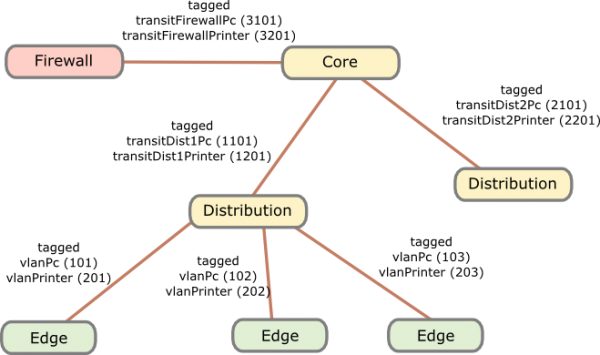
The names of the VLANs on every edge switch are the same, just the VLAN IDs are different. This allows the RADIUS server to return the name of the VLAN the switch should assign to a port or MAC. As the name is the same for all switches, the RADIUS server does not need to know the VLAN IDs. The RADIUS server just has a table that tells it which MAC or common name (in case of 802.1x EAP-TLS) does go into which VLAN. All your switches are configured exactly the same, just the management IP address and the VLAN IDs are different … that makes deploying and maintaining really easy.
For getting the traffic from the edge to the data center I recommend using VRF (Virtual Routing and Forwarding) and OSPF. Just assign the PC VLANs in one VRF and vlanPrinter in an other VRF. The link from the core to the firewall is also tagged. The firewall is now the only way to get from the PC network to the printer network.
I hope that example makes the setup clear, if now just write a comment.
Android Devices send many Multicast Packets per Second for Chromecast – How to disable it?
June 28, 2014
While tracing/sniffing for something, I mirrored all packets of my mobile phone to Wireshark and I was was really astonished to see many multicast DNS requests (_googlecast._tcp.local) from my mobile …
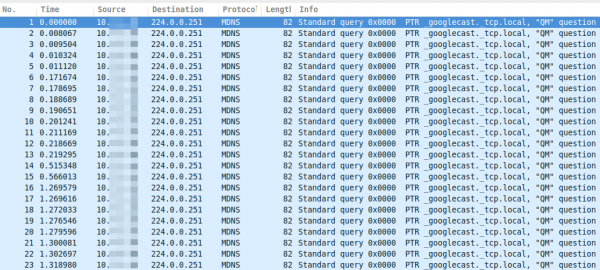
As you see, these are more than 15 packets per second, which leaded at once to following 3 thoughts:
- That can’t be good for the battery
- The mobile is sending this surely not only in my home network but also in hotspot networks … I don’t like that for security/privacy reasons (specially what happens if the phone gets an answer and maybe sends more info about itself)
- I’m not using Chromecast anywhere
Which leaded at once to the question:
- How can I disable this?
So I went on a search trough the Internet …. but I was not able to find a solution. So the question to the community .. has someone an idea how I can disable that?
ps: I found only one guy asking the same question in the xda developers forum
Communication analysis of the Avalanche Tirol App – Part 1
February 16, 2014
For some time now a mobile app for Andriod phones and iPhones is advertized which is called the official app of Tirol’s Avalanche Warning Service and Tiroler Tageszeitung (Tirol Daily Newspaper), so I installed it on my Android phone some days ago. Yesterday I went on a ski-tour (ski mountaineering) and on the way in the car I tried to update the daily avalanche report but it took really long and failed in the end. I thought that can’t be possible be, as the homepage of the Tyrol’s Avalanche Warning Service worked without any problems and was fast.
So when I was home again I took a closer look the traffic the app sends and receives from the Internet … as I wanted to know why it was so slow. I installed the app on my test mobile and traced the traffic it produced on my router while it launched the first time. I was a little bit shocked when I look at the size of the trace – it was 18Mbyte big. Ok this makes it quite clear why it took so long on my mobile 😉 –> So part of the post series will be getting the size of the communication down , so I opened the trace in Wireshark and took at look at it. First I checked where the traffic was coming from.
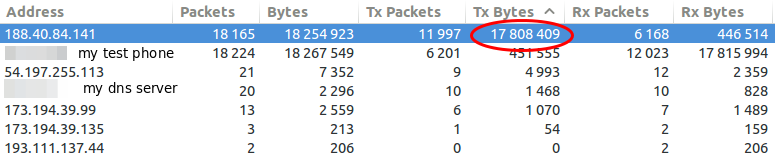
So my focus was one the 188.40.84.141 which was the IP address of tirol.lawine-app.com and it is hosted by a German provider called Hetzner (you can rent “cheap” servers there). As I opened the TCP stream I saw at once a misconfiguration. The client supports gzip but the server does not send gzipped.
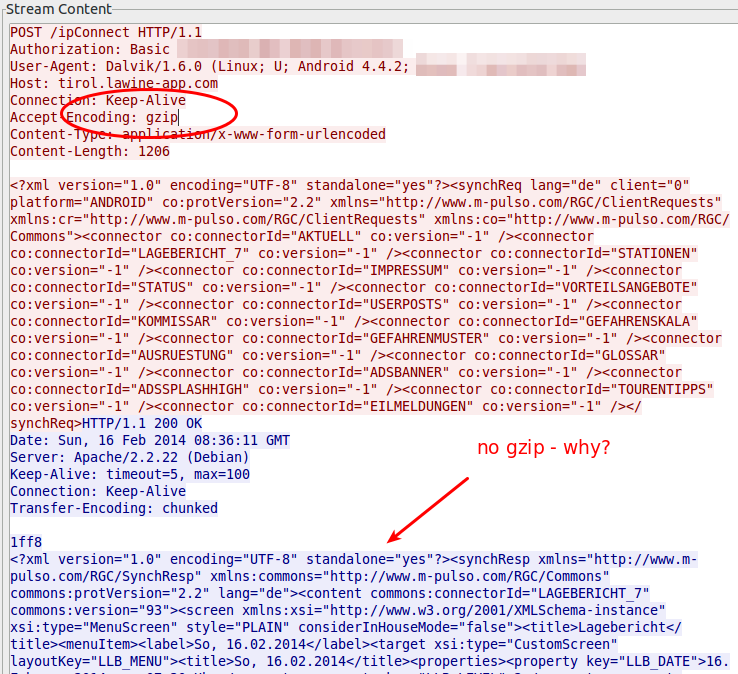
Just for getting the value how much it would save without any other tuning I gzipped the trace file and I got from 18.5Mbyte to 16.8Mbyte – 10% saved. Than I extracted all downloaded files. jpg files with 11Mbyte and png files with 4,3Mbyte … so it seems that saving there will help the most. Looking at the biggest pictures leaded to the realization that the jpg images where saved in the lowest compress mode. e.g. 2014-02-10_0730_schneeabs.jpg
- 206462 Bytes: orginal image
- 194822 Bytes: gimp with 90% quality (10% saving)
- 116875 Bytes: gimp with 70% quality (40% saving)
Some questions also arose:
- Some information like the legend are always the same … why not download it only once and reuse until the legend gets update?
- Some big parts of the pictures are only text, why not sent the text and let the app render it?
- The other question is why are the jgep files 771 x 566 and the png files 410×238 showing the same map of Tirol? Downsizing would save 60% of the Size (with the same compression level)
- Why are some maps done in PNG anyway? e.g. 2014-02-10_0730_regionallevel_colour_pm.png has 134103 Bytes, saving it as jpeg in gimp with 90% quality leads to 75015 Bytes (45% saving)
So I tried to calculate the savings without minimizing the information that are transferred – just the representation and it leads to over 60% .. so instead of 18Mbyte we would only need to transfer 7Mbyte. If the default setting would be changed to 3 days instead of 7, it would go even further down, as I guess most people look only on the last 3, if even that. So it could come down to 3-4 Mbyte … that would be Ok, so please optimize your software!
I only wanted to make one post about this app, but then I found, while looking at the traffic, some security and privacy concerns I need to look into a bit closer …. so expect a part 2.
Howto find all websites running on a given IP address
January 5, 2014
Sometimes you’ll (at leased if you’re like me 😉 ) want to know which other websites are hosted on the same server respectively the same IP address. The search engine Bing provides a nice feature for this. Just enter ip:50.57.15.204 to get a list of the website which Bing knows to run on that IP address.

But even better, Andrew Horton has done a Bash script which allows you to check that from the command line. This looks even better:
$ ./bing-ip2hosts www.theregister.co.uk

[ 50.57.15.204 | Scraping 11-13 von 13 | Found 9 | / ]]

1695693.r.msn.com

2549779.r.msn.com

forums.channelregister.co.uk

forums.theregister.co.uk

media.theregister.co.uk

m.theregister.co.uk

regmedia.co.uk

www.channelregister.co.uk

www.theregister.co.uk
D-root is changing its IPv4 address on the 3rd of January.
December 15, 2012
I repost the full advanced notice from the University of Maryland (which administrates the D root DNS server).
Here the original Post:
This is advance notice that there is a scheduled change to the IPv4 address for one of the authorities listed for the DNS root zone and the .ARPA TLD. The change is to D.ROOT-SERVERS.NET, which is administered by the University of Maryland.
The new IPv4 address for this authority is 199.7.91.13. The current IPv6 address for this authority is 2001:500:2d::d and it will continue to remain unchanged.
This change is anticipated to be implemented in the root zone on 3 January 2013, however the new address is currently operational. It will replace the previous IP address of 128.8.10.90 (also once known as TERP.UMD.EDU).
We encourage operators of DNS infrastructure to update any references to the old IP address, and replace it with the new address. In particular, many DNS resolvers have a DNS root “hints” file. This should be updated with the new IP address.
New hints files will be available at the following URLs once the change has been formally executed:
http://www.internic.net/domain/named.root
http://www.internic.net/domain/named.cache
The old address will continue to work for at least six months after the transition, but will ultimately be retired from service.
IPv6 activated for robert.penz.name
April 7, 2012
I’ve just activated IPv6 for my blog. You should now get A and AAAA records for the DNS name robert.penz.name. I hope it does not break anything, but you need to go with the time as the saying is.
A query should show following:
$ host robert.penz.name

robert.penz.name has address 173.245.61.149

robert.penz.name has address 173.245.61.58

robert.penz.name has IPv6 address 2400:cb00:2048:1::adf5:3d3a

robert.penz.name has IPv6 address 2400:cb00:2048:1::adf5:3d95

robert.penz.name mail is handled by 10 mail.penz.name.
Firefox Addons I use and recommend
July 25, 2009
I thought I share the Firefox plugins I use and which make me use Firefox in the first place. Without these plugins Firefox would be just a browser of many and the webkit browsers render faster on my Kubuntu ;-). So these Plugins make the difference for me.
- NoScript: Without I feel “unsafe” in the internet. It allows JavaScript, Java and other executable content to run only from trusted domains of your choice. You can activate JS only for a session also, so you’re save again next time.
- Cookie Monster: This plugin allows me to manage my cookies. I can set from which domains I accept which kind. e.g. I accept cookies only for the session from a domain if it is needed.
- Xmarks: I use this plugin to sync my bookmarks between systems and also to have a backup at all times of them. You can also use it do sync/save your stored passworts securely. You can also use your own server.
- DownloadHelper: You never know when you would like to download a flash movie or something like this onto your PC. This plugin will enable you to do so.
- Yip: If you’re using something like meebo.com for instant messaging you surely would like to get notifications of a new message also outside the tab in your browser, as it mostlikely happens that you’re working with an other program or in an other tab. If so, take a look at Yip, as its supports supports Fluid and Prism which cover the large majority (100%?) of currently implemented notifications.
Clicky Web Analytics the alternative to Google Analytics
December 14, 2008
I’m using Google Analytics for some time now, it basically works, but it has some short comings like that the reports do only get updated every 24h, or that it is not able to track bound links without extra work on my side. But the most import part is that I don’t want that google knows everything. So I started to look for a valid alternative. I tried some local installable open source tools but decided to go with an other SaaS. If you’re using NoScript for your Firefox you might know it already I started using Click Web Analytics. Take a look at this screenshot, it looks like most web 2.0 sites, simple, clean design with a white background.

Whats nice is that you can do a real time campaign and goal tracking and that you can track every visitor who comes to your web site and if they accept cookies all their history. This will show you which power cookies gives website providers. You should really think to disable them or remove them on every start of your browser. But as long the most users have activated it I will also take a look at it and have a nice show case for people I talk over this.

No SWAP Partition, Journaling Filesystems, … on a SSD?
December 7, 2008
I’m going to get an Asus Eee PC 901go, which has a Solid State Disk (SSD) instead of a normal hard disk (HD). As you know me I’ll remove the installed Linux and install my own Kubuntu. I soon started to look at the best way to install my Kubuntu and I found following recommendations copy and pasted on various sites:
- Never choose to use a journaling file system on the SSD partitions
- Never use a swap partition on the SSD
- Edit your new installation fstab to mount the SSD partitions “noatime”
- Never log messages or error log to the SSD
Are they really true or just copy and pasted without knowledge. But first why should that be a problem at all? SSDs have limited write (erase) cycles. Depending on the type of flash-memory cells they will fail after only 10,000 (MLC) or up to 100,000 write cycles for SLC, while high endurance cells may have an endurance of 1–5 million write cycles. Special file systems (e.g. jffs, jffs2, logfs for Linux) or firmware designs can mitigate this problem by spreading writes over the entire device (so-called wear leveling), rather than rewriting files in place. So theoretically there is a problem but what means this in practice?
The experts at storagesearch.com have written an article SSD Myths and Legends – “write endurance” which takes a closer look at this topic. They provide following simple calculation:
- One SSD, 2 million cycles, 80MB/sec write speed (that are the fastest SSDs on the market), 64GB (entry level for enterprise SSDs – if you get more the life time increases)
- They assume perfect wear leveling which means they need to fill the disk 2 million times to get to the write endurance limit.
- 2 million (write endurance) x 64G (capacity) divided by 80M bytes / sec gives the endurance limited life in seconds.
- That’s a meaningless number – which needs to be divided by seconds in an hour, hours in a day etc etc to give…
The end result is 51 years!
Ok thats for servers, but what is with my Asus 901go?
- Lets take the benchmark values from eeepc.it which makes it to a max of 50 MByte/sec. But this is a sequential write, which is not the write profile of our atime, swap, journaling… stuff. That are typically 4k Blocks which leads to 2 MByte/sec. (Side node: The EeePC 901go mount the same disk of SSD ‘EeePC S101, to be precise model ASUS SATA JM-chip Samsung S41.)
- We stay also with the 2 million cycles and assume a 16GB SSD
- With 50 MByte/sec we get 20 years!
- With 2 MByte/sec we get 519 years!
- And even if we reduce the write cycles to 100.000 and write with 2 MByte/sec all the time we’re at 26 years!!
And all this is with writing all the time, even ext3 does write the journal only every 30 secs if no data needs to be written. So the recommendation to safeguard SSDs, as the can not write that often is bullshit!!
So lets take a closer look at the 4 points at the beginning of this blog post.
- Never choose to use a journaling file system on the SSD partitions: Bullshit, you’re just risking data security. Stay with ext3.
- Never use a swap partition on the SSD: If you’ve enough space on your SSD use a SWAP partition it will not be written onto it until there is to less RAM, in which case you can run a program/perform a task which otherwise you could not. And take a look at this article.
- Edit your new installation fstab to mount the SSD partitions “noatime”: That is a good idea if all the programs work with this setting as this will speedup your read performace, specially with many small files. Take also a look at nodiratime.
- Never log messages or error log to the SSD. Come on, how many log entries do you get on a netbook? That is not an email server with > 1000 log lines per second.
Please write a comment if you disagree or even agree with my blog post. Thx!
Powered by WordPress
Entries and comments feeds.
Valid XHTML and CSS.
38 queries. 0.061 seconds.